| |
 Suspicious Phone Calls - Would you give a stranger your house keys or your wallet? Probably not, because you don’t know them. It’s the same on the phone – you can’t be sure who you are talking to! Here are a few tips on how you can protect yourself and tell a genuine phone call from a scam. Suspicious Phone Calls - Would you give a stranger your house keys or your wallet? Probably not, because you don’t know them. It’s the same on the phone – you can’t be sure who you are talking to! Here are a few tips on how you can protect yourself and tell a genuine phone call from a scam.
21st July 2017
*************
StripMail is a FREEWARE utility that:
- Strips the characters ">" and "|" from forwarded e-mails.
- Formats the text into paragraphs, making it easier to read.
- Changes the text's right margin, by indenting.
- Can be used with any e-mail client.
Click here to download the .exe file - There is no need to install, simply save to your Desktop
and run when you need to remove those annoying >>>>>>>>>>>>> and 1. 2. 3. etc from emails.
More instructions here.
*****************************************************************************
Basic email courtesy tells us to NEVER SEND MESSAGES IN ALL CAPITAL LETTERS. All caps are fine for SMALL headlines or other key phrases, but are much harder to read when used throughout a lengthy letter. Also, ALL CAPITAL LETTERS give recipients the feeling they are being shouted at!
Changing CAPITAL LETTERS (upper case) case text to lower case and back again in Ms/ Word
Is there an easy way to convert it to traditional upper and lower case sentence structure.
Yes - By selecting the target text and pressing F3 while holding down SHIFT, all the caps will change to lower case. Press F3 again, while still holding down SHIFT, and the first letter of each sentence will be capitalized. Another SHIFT + F3 will return everything to all caps. However, other capitalization - such as names, places, and titles - will still need to be edited separately.
Tip: If you don't have Microsoft Word, then you can do the same job by going to this web address.
Contributed by Phil Davies - Harlech, North Wales - Jan 2012
*****************************************************************************
Are you a frequent user of Microsoft Excel?
If the answer is yes then there is free software available to make life so much easier for you.
You can download the latest Add-on by clicking here. If you are a home user, then it's free!
*****************************************************************************
More FREE Programs and services - All you need is time to read and try them out!
*****************************************************************************
Emailing to 'Multiple Addresses' without using BCC.
When we send out an EMail to multiple EMail addresses without hiding them, we're contributing to spam. How? Those EMail addresses are worth the price of gold to spammers! The following website explains all about BCC (Blind Carbon Copy), how to use it and the advantages of doing so.
When someone sends you an EMail with cc's (carbon copies) or bcc's (blind carbon copies) to a hundred other people, DON'T make the mistake of replying to the person who sent you the EMail by clicking the Reply All button. Not only will the 'sender' get your EMail, but so will every single other person that received the original EMail. Instead, be sure to click the Reply button so that ONLY the sender of the EMail gets your reply.
*****************************************************************************
Free alternatives to Microsoft Office - Buyers Guide
 Winner - Open Office More here... Winner - Open Office More here...
Free Antivirus - Buyers Guide More here...
*****************************************************************************
 Inkjet printers have now become very cheap to buy but the manufacturers recoup the loss by selling very expensive ink cartridge refills. As a result, there are now many sources of cheap compatible ink suppliers. Listed below are some recommended sources. Inkjet printers have now become very cheap to buy but the manufacturers recoup the loss by selling very expensive ink cartridge refills. As a result, there are now many sources of cheap compatible ink suppliers. Listed below are some recommended sources.
Internet-ink Based in Nottinghamshire (Freephone tel)
NB. Don't forget, using compatible ink may invalidate your 12 months guarantee. How the manufacturer could prove that you are not using their own branded ink is open to speculation! Tip: Just keep your used empty original ink cartridges in case the printer has to be returned under warranty!
Tip: Beware of buying ink cartridges from Ebay, no matter how much of a
bargain you are tempted with. If you are not dealing with a reputable seller, you may get stung!!
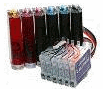 An even cheaper way of printing is to use a Continuous ink system, very useful if you regularly use your printer for printing large colour photographs. These ink reservoirs can save up to 90% printing cost. CISS solutions is just one example of a company which supplies this new revolution in printing. An even cheaper way of printing is to use a Continuous ink system, very useful if you regularly use your printer for printing large colour photographs. These ink reservoirs can save up to 90% printing cost. CISS solutions is just one example of a company which supplies this new revolution in printing. |
 jeffdaviesATtalktalk.net
 *****************************************************************************

 Do you want to modify an existing PDF file?

